Positive or negative, and where it flips.
Net gamma across the 0DTE chain, the recorded flip, zero gamma and the call and put walls, updated through the session.
Gamma by strike sits beside the chart, so you see the walls form.
Gamma regime, call and put walls, zero gamma and the prior day's levels with calibrated odds. Live on your own PC, from your own market data.
One-time licence. No subscription. Check the requirements before you buy.
Model calibration (the odds model the Monitor runs): Brier 0.175 out of sample (0.171 in sample; 0.250 is the no-skill baseline).
Built for SPX 0DTE traders who want to see positioning and levels without stitching sources together.
Net gamma across the 0DTE chain, the recorded flip, zero gamma and the call and put walls, updated through the session.
Gamma by strike sits beside the chart, so you see the walls form.

Prior high, low and close each get a chance of being reached, set at the 9:30 open and never changed. When a level is hit, the time replaces the odds.
18 Sep: the prior-day low had 22% at the open. Reached at 12:25.
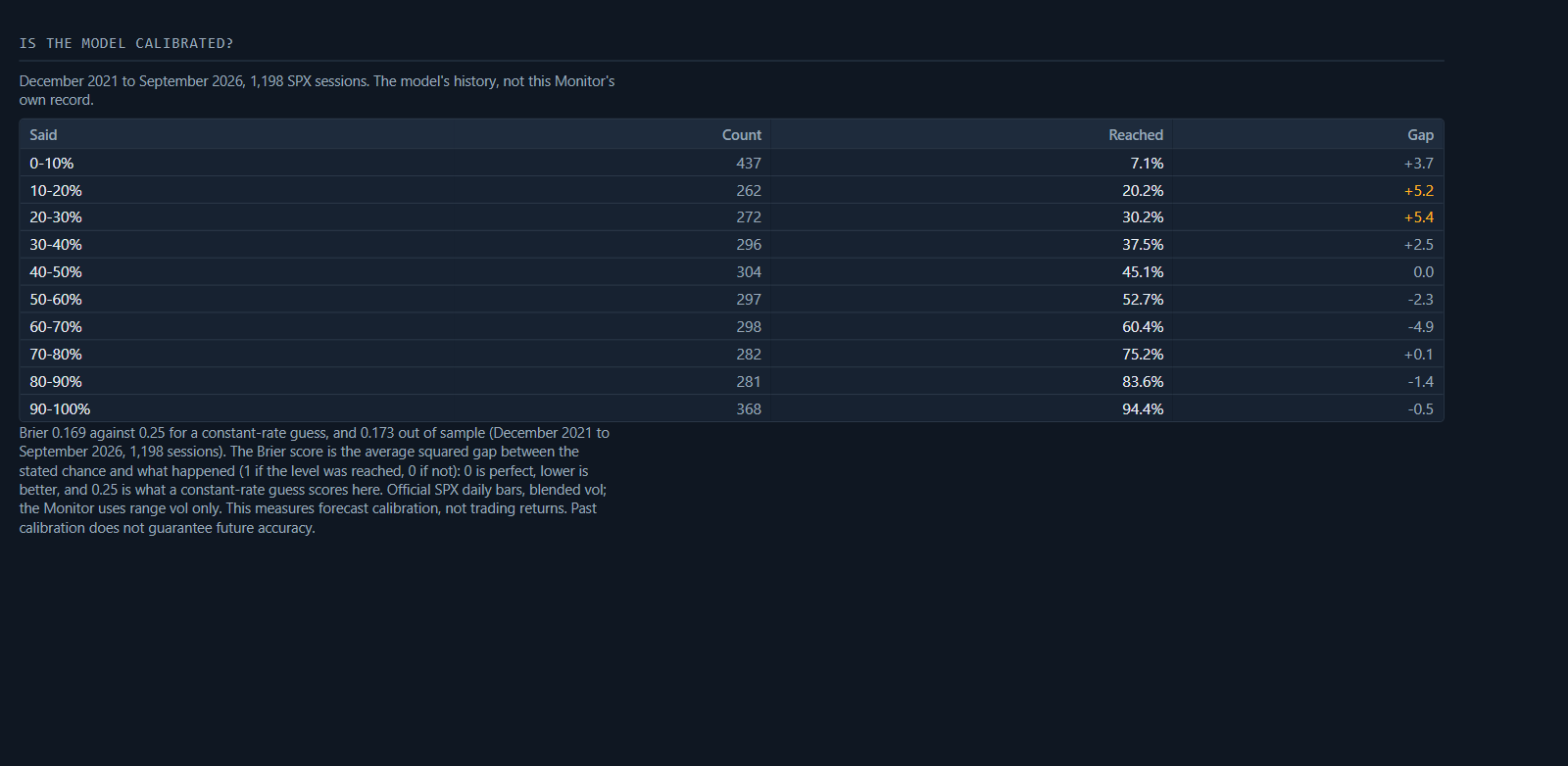
The odds model is back-tested on 1,198 SPX sessions, December 2021 to September 2026. When it said 20–30%, the level was reached 30.2% of the time.
The table shows the blended-volatility model (Brier 0.169; 0.173 out of sample). The Monitor runs a range-volatility variant of the same model (0.171; 0.175 out of sample); the two are within noise of each other over 1,198 sessions. 0.250 is the score of a constant 50% forecast; always forecasting the historical hit rate would score 0.250. This measures forecast calibration, not trading returns. Past calibration does not guarantee future accuracy.
Back-tested on market data, December 2021 to September 2026, 1,198 sessions.
A single Windows installer.
Windows 10 or 11 (64-bit). The installer brings everything else it needs, including its own Python.
Paste your API key and secret on the setup screen.
Install the Webull OpenAPI Python package with one click on the setup screen (Step 2); the key guide in the download also gives the exact command.
The computer on during the trading day (09:20 ET to 20 minutes after the close).
Replay of any session it has collected. Every step is in the setup guide.
No subscription, no account with us. You bring your own market data under your own agreement with your data provider.
RequirementsNot offered or sold to New Jersey residents.
$200 per licence, plus applicable sales tax
· Privacy
Buy HAB Regime Monitor
Tick both boxes to enable Buy.
All sales are final once the download link is delivered, except where the law requires otherwise. If we issue a refund, it is the price less the payment processor's fee; any sales tax is refunded in full. Check the requirements above before you buy.
An SPX 0DTE brief before the open, then a public grade after the close. Right or wrong, every one is scored in the open.